All guides
See who saw your ads
On the Leads page, Who saw your ads shows how many people your Meta ads reached today, yesterday, this week and till date, what you spent, what each lead cost, and which platform (Facebook, Instagram and others) gives you the best value.
Before you start
- ✓At least one ad created on Meta through Promote (see Promote a post as a Meta ad)
1. Open Who saw your ads
Tap Leads in the menu. Who saw your ads is the first panel on the page. It shows only when the selected client has at least one ad on Meta. The numbers come from Meta and refresh every 15 minutes.
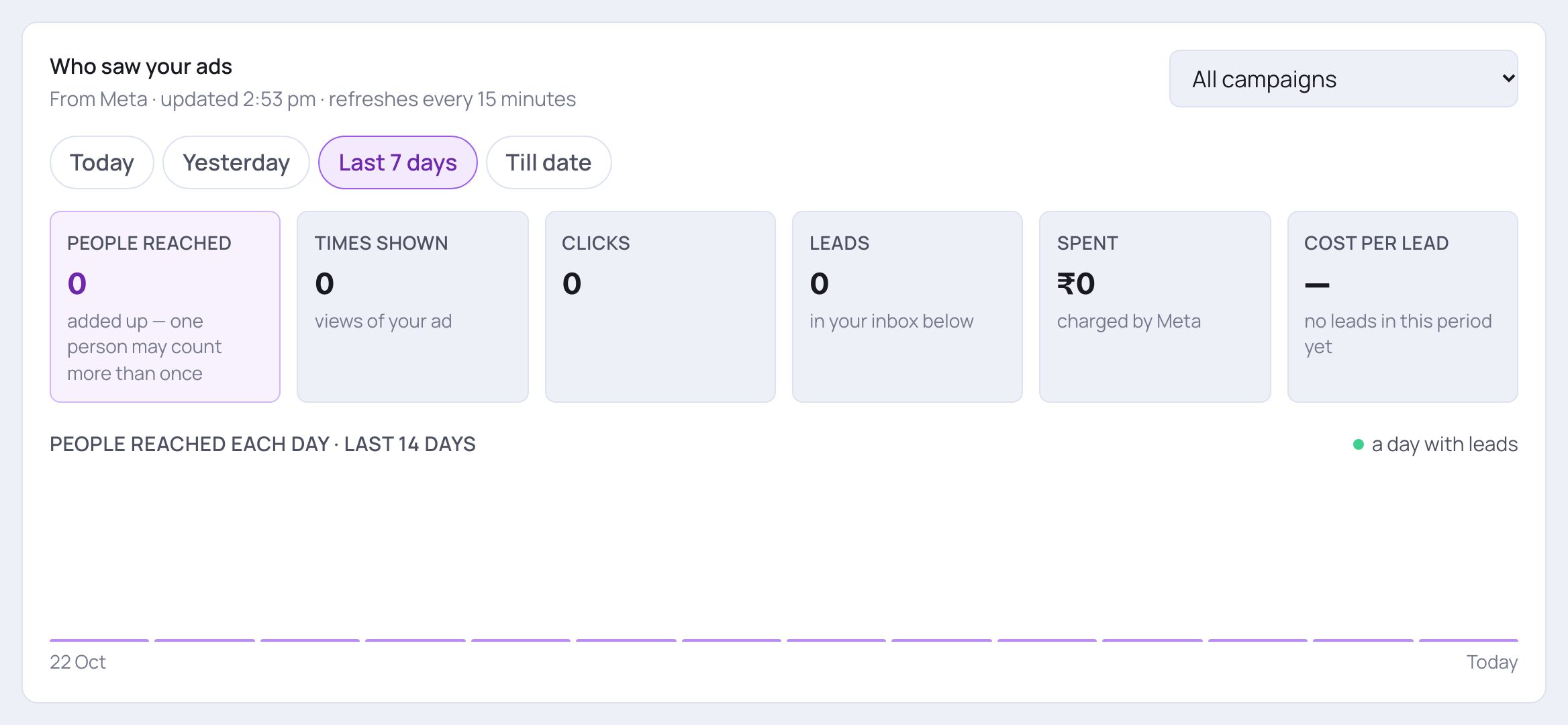
- 1Under the title you see when the numbers were last updated from Meta.
- 2With more than one campaign, pick one here, or keep All campaigns to add them together.
- 3Tap a period: Today, Yesterday, Last 7 days or Till date (since the ad started).
- 4People reached is how many different people saw your ad in that period, each person counted once.
- If it says one person may count more than once, the number was added up day by day (for several campaigns, or when Meta couldn't be reached).
2. Read the six numbers
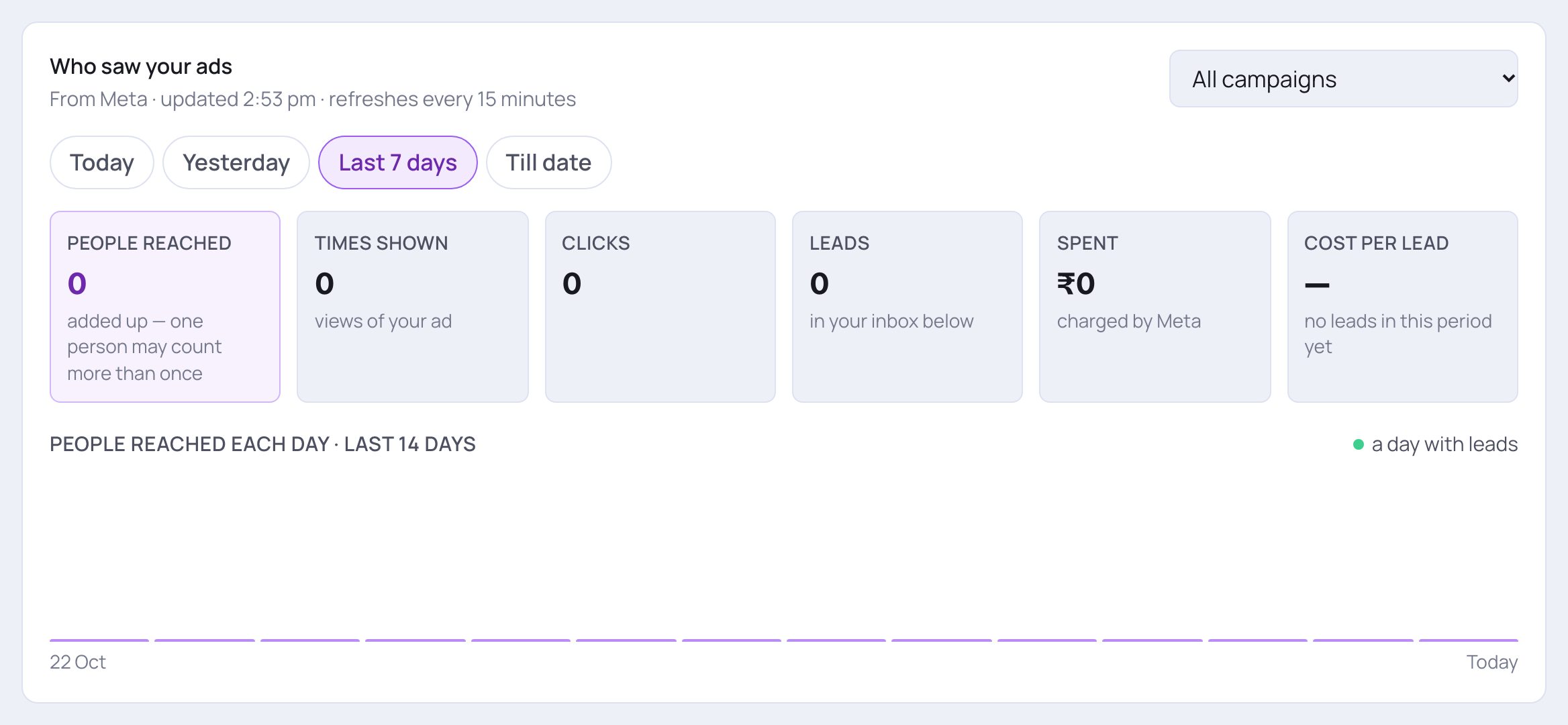
- 1Times shown counts every showing; the hint says about how many times each person saw it.
- 2Clicks is how many times people tapped the ad, and what share of views that is.
- 3Spent is what Meta charged for this period. Meta bills your ad account directly.
- 4Cost per lead is the money spent divided by the leads. Leads next to it counts the leads in your inbox for the same period.
3. See where your money goes
Meta shows your ad on Facebook, Instagram, Messenger and other apps (Audience Network). Under the six numbers, a table Where your money goes splits the money by platform and says, in plain words, which one is worth it. It appears once Meta has numbers for the platforms your ad ran on. Each row is one platform: what it Spent (and its share of the money), the Views, the Link clicks and the leads it brought. The last column, What it says, gives a verdict: Best value for the cheapest leads, a cost per lead that is several times the best one, money spent with no leads yet, or too little to judge / too early to judge. Platforms are judged on their own numbers. One day is too little to call anything a waste, and nothing is switched off unless you do it. When one platform is wasting money, a yellow line above the table says how much it took and for how many leads, while the best platform brings leads cheaper.
4. Check the trend, then decide
Before turning a platform off, look at how the ad has done day by day. With a single campaign in view (pick it at the top, or a client with one campaign), each platform row in the table gets a Turn off button, and a platform that is off shows Off with Turn back on.

- 1Before you switch anything, look at the chart. Each bar is one of the last 14 days; hover over a bar to see that day's people, views, clicks, leads and spend.
- 2A green dot marks a day that brought leads.
- To switch a platform off, tap Turn off on its row and confirm. The same budget then goes to the other platforms, and Meta re-learns for a few days. Tap Turn back on any time. At least one platform always stays on.
- Only the account owner can switch platforms.
💡 SlideoClip only suggests; you decide. Being seen on a platform can matter to you even when it brings fewer leads, for example Instagram for a saree shop's brand. That's why nothing is switched off by itself, not even on Autopilot.
Good to know
- Judge platforms on Last 7 days or Till date, not on one day.
- When a platform keeps wasting money, a card can also appear on the campaign's card in Campaigns: Turn off Instagram (for example) to approve, or Keep it on to leave it. See Manage your running ads.
- After switching a platform, give Meta a few days before judging again.
Questions
I don't see Who saw your ads.
It shows only when the selected client has an ad that was created on Meta. Pick All clients, or the client that runs the ad, in the client switcher.
Why is People reached smaller than Times shown?
One person often sees an ad more than once. People reached counts each person once; Times shown counts every showing.
Why don't my numbers match Ads Manager exactly?
The panel refreshes every 15 minutes and counts days in India time. Leads are the ones in your SlideoClip inbox.